Tag: open source

Strand PWA Runtime (Part 2.5)

Strand is a PWA runtime for running web applications in a more integrated manner for KDE Plasma.

Right now Strand has two parallel development tracks; an AI-driven prototyping track to test the feasibility of features, and a second human-driven track where I’m building the final product.

I’ll mostly cover the events of the AI track in this post, which I’ve been dogfooding as I slowly get the human track on-rails. The usual caveats of code quality and security are in full effect.

Performance & Structure

The first version of the runtime used one WebEngine per application process. Part of this was me receiving incorrect information from the AI. After understanding the WebEngine and WebEngineProfile structure more thoroughly, I decided a system of dynamically determining the host process would lead to better resource efficiency.

Now, instead of one process per app, when a webapp starts it generates a “Process hash” based on the configuration and flags being applied to WebEngine. It will then see if there’s a Strand process running with that hash, using it if available. This immediately lead to hundreds of megabytes in savings when running multiple instances, while still allowing apps to potentially use alternative settings if required.

One major pain point is hardware acceleration. I’m having significant of trouble getting it to work as it really requires the stars to align quite precisely. Right now there’s just no acceleration for reasons ranging from my specific hardware, to Wayland, to a witches brew of flags – and if anything is wrong there’s just no acceleration. I checked to see if I could run another KDE QtWebEngine-oriented app at full speed – Falkon – but it also suffered. Commentary online is underwhelming.

My new benchmark. I’ll score the hardware acceleration based on how long I get before the lag kills me. Right now it’s “202”.
New Features Tested

The most significant new feature is header integration, which is the culmination of 3 smaller features.

The most visually obvious is the addition of custom CSS with system color support. Strand injects CSS variables into applications with system colors, and when used by the custom CSS, can easily give web apps much more cohesive headers. Strand pays special attention to header-oriented colors, guaranteeing their availability along with the accent color. These apps are also smart enough to update their colors when changed on a system level. Of course, custom CSS can be disabled. The only caveat is that some apps still have the scrollbar peeking in, which could potentially be fixed case-by-case with CSS.

The next addition is the ability to list “Drag Region Selectors” in the manifest files. These are simple DOM selectors which trigger native window dragging when an element matches the selection criteria. This system accounts for interactive child elements, so things like buttons and fields in drag areas work as-expected.

Toolbars and menubars are no longer mandatory. In the manifest file you can specify “Safe Toolbar Removal” selectors paired with URLs. If the selector criteria is met and “Allow Smart Hiding of Toolbar” enabled for the app, Strand will auto-hide the toolbar. This works very well! The toolbar will re-appear if the app navigates away from a “Safe Situation”, allowing users to access browser-like navigation. A good example of this is an SSO flow; if SSO is occurring, the toolbar re-appears, and the user can navigate back to the app if the sign-in process is interrupted. Even then a user holding the alt key will re-show the toolbar, and if Strand blocked an outgoing link, the toolbar will resurface so the user may interact with that event.

These 3 features together make headers in web apps feel shockingly native at times. I’m particularly impressed by how integrated Teams feels. Placed between Dolphin and Kate it looks great, and the dragging behavior of the header areas are spot-on.

The header-centric features are also designed to degrade gracefully. We are connecting to ever-changing websites and I didn’t want to introduce injections libel to break entire applications. In the event a web app changes significantly, only the integrations should be lost, so at worst you’ll still have a functional web app. This is also one reason why I won’t be introducing app-specific Javascript injection.

Stand applications can now be added to menus via the welcome screen, and applications are appropriately categorized when added. The next step will be to have a complete installation flow.

Strand doesn’t yet have an installation flow, but launching Discover from FlatHub worked as expected.
Conclusion / Future / The Human Track

Right now the AI track is getting very, very close to what I’d like in terms of functionality and main-window presentation. As the AI churns overall code quality goes down, but it does continue to feed me methodologies which would have easily cost me weeks of research, letting me research on the actually important topics. It also continues to show me what’s possible in general, and when it starts to fail I know I’m probably moving in a bad direction.

Next steps for the AI track are likely going to be in the permissions system, and ensuring advanced functionality like streaming and various portals work. After that there will only be minor additions to the prototype software.

I’ll end with an update on the human track; progress is going intentionally slowly. I wanted to flesh out the process management in the AI track first before over-committing to what will ultimately be the final structure. The human track has the first steps of the startup sequence, and a much better organized set of utilities and data-management classes. I’m also re-assessing the use of Kirigami/QML for building the GUI, as it just leads to nicer interfaces and I do have some experience with it.

Anyway, that’s the updates so far!

If anyone knows the secrets of WebEngine + Wayland + Nvidia, I’d love to hear. I might assemble some memory benchmarks in the next week or two as well, too. There’s also a .deb package I can produce of the AI track; I wholly would NOT recommend installing it, but if people want to see where this idea is going, or even the AI slop source, I can put it up. But I’ll literally name it the “eatYourCat” deb and put it in the “shootYourDog” repo, and it will be with the express understanding that it’s not fit for use and will not be maintained.

New Icons, Iconoclast Pipeline

Over the month of November work has been started to refresh the full-colour icons in Breeze as an extension of the “Blue Ocean” initiative. With literally hundreds of hand-created vector icons in our roster we’ve had to develop new processes and are working on a more robust pipeline so this refresh can be done in a somewhat timely manner.
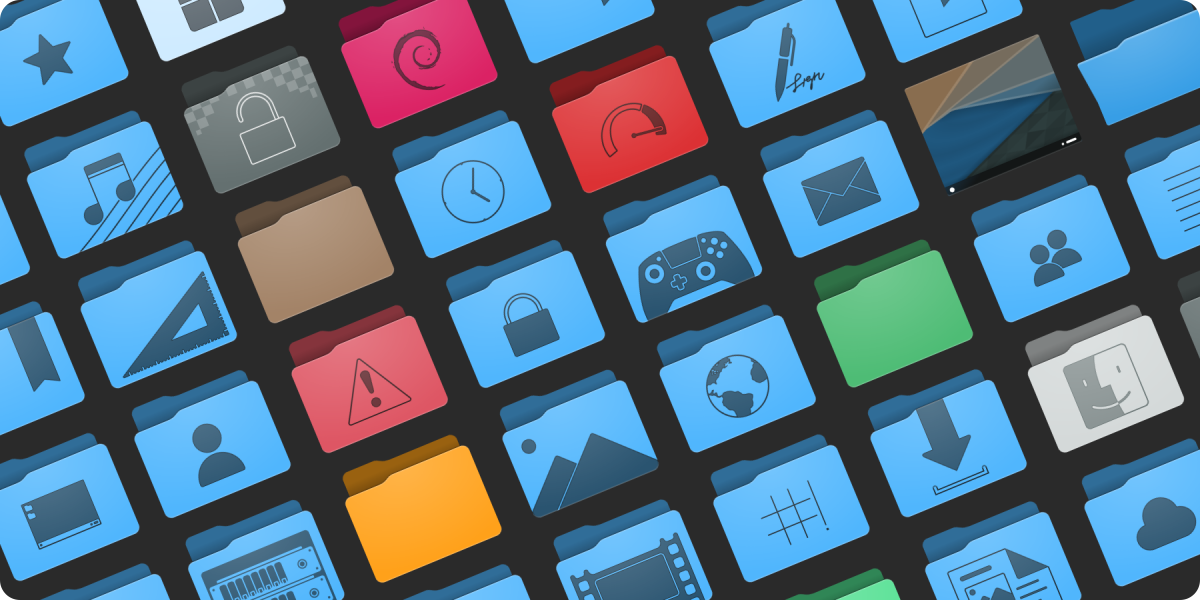
Preview of the new folders. Subject to change and refinement.

As was the method for Blue Ocean on the desktop widgets and design, the icons will be a gradual rollout over a few releases. We do have a strategy in place to ensure that this won’t be too jarring or inconsistent during the transition. The current plan is to update both all mimetypes and all places in time for the 5.24 release.

Like our current icons the new icons have adaptive capabilities. Beyond that some additional select icons such as the new desktop icon are also adaptive, and there are plans for other icons to also take advantage of this feature where it would not be obnoxious. Compared to existing icons the refreshed content will be softer, more detailed, and less flat. These icons are also prepared with future capabilities in mind, and as enhancements are made to KDE Frameworks these icons may expose new and interesting features.

Finally, we’re expanding the number of sizes the icons come in, so they look ideal at more zoom levels in your file browser. Currently colour places icons are offered in 32, 48, 64, and 96 pixel sizes, and mimetypes are offered in 32 and 64 pixel sizes. Refreshed icons in both places and mimetypes will be offered in 32, 48, 64, 96, 128, and 256 pixel sizes with no missing graphics. We already have all folders in all of the above sizes, and in under a month while also writing our software we have over doubled the number of folder icons in Breeze. We’re estimating we will more than triple in the number of mimetype icons.

To get this work done we’ve built new tools for the express purpose of making mass iconography far easier for even individual artists, so I’m very pleased to state that a new icon and SVG pipeline is underway and despite being unfinished is producing results. This Python-written pipeline is capable of adding guides, rulers, and setting up grids for existing icons, standardizing existing icon colours, assembling entirely new icons from templates and components, and aggressively optimizing icons. With this authors will be able to have a “golden copy” of their icon sets where they can focus purely on design, letting the software take care of cleaning up the documents and assembling the individual pieces. The folders in the above image were assembled by the pipeline, with no hand-tuning.

In terms of optimization some extreme cases have seen unoptimized Oxygen icons drop 75% or their filesize. In less ideal situations a few simple hand-optimized test icons I produced run through the pipeline saw 10-20% reductions in filesize. The new optimizer is not built on any existing tools, and is an entirely new thing. At similar settings the new optimizer is on par or slightly ahead of Inkscape in most tests, but at the same time it’s also more specialized and the output cannot be edited when certain stages are enabled. It’s also targeted towards TinySVG and should not be expected to work on full-fat images (though, accommodations have been made). There is still work to be done too, and in the future more optimization steps are on the table to further reduce output size.

Not only is this pipeline beneficial to KDE artists, but history has proven even the roughest artistic tools we produce are regularly used outside of Plasma development. With this in mind we plan to release our new tooling separate from Breeze as its own package/download after polishing it to a mirror shine. Currently nicknamed “Iconoclast”, we are specifically setting out for this tooling to be useful and ready for the wider community beyond KDE.

Iconoclast will include our new pipeline, a manual, tips and advice, and another entirely new icon set named “Bones”, which is already in progress. The pipeline itself is strongly configurable with ini files, so KDE-isms can be removed and it can be adapted to work for icons sets that may have different flows through configuration. The Bones icon set will be a minimal base which can either be built on top of, or used as a reference, and these icons will released in the public domain. Different projects with different licenses can just take it and use it, and it’s uses generic technologies not tied to KDE. The pipeline itself will be GPL, and I don’t have a specific timeline for when the kit will be released but once it’s solidified I’ll make an announcement; though it’s likely to be after the new year.