Category: Open Source

Fiber Update; WebEngine vs CEF

Fiber has seen some active development, and over the course of a long 3-day weekend full of hacking I’m glad to say that exactly 0 progress has been made! Of course that would be a bit of a fib, I’ve spent the weekend re-factoring all of the profiles code and organising the codebase structure.

I also spent a good chunk of my time reading Qt and KDE coding guidelines and documentation on how files and classes should be structured, and then I applied that information to Fiber. The result now is well commented code, and consistent naming conventions in-line with other Qt/KDE projects.

But re-factoring code isn’t what I’m really interested in talking about…

WebEngine vs CEF

When I started Fiber I worked under the assumption that WebEngine would be the engine for this browser; it’s an official Qt extension, being actively developed, and isn’t going anywhere. After Fiber kind of came into the light I had a comments and emails pointing me to CEF, the “Chromium Embedded Framework” as an alternative to WebEngine.

After doing research it’s severely divided my thoughts on what to use.

What is it?

CEF started as a Chromium-based project meant to create a stable API relative to the rapidly changing engine, something non-qt applications could use as easily and reliably as Qt applications do with WebView . While it started off as just an implementation CEF has a defined stable enough API that it turned into a sort of pseudo-standard. Servo, Mozillas new wonder engine is actually building itself to be a native CEF implementation, meaning that future Firefox will actually be a CEF-based browser.

CEF, despite being not so well-known, is actually used by some very high-profile companies which lends credence to the longevity of the project. Adobe, Valve, Blizzard, Amazon, and other big names have thrown their chips behind CEF. Valve in-particular bases their Steam client on the thing.

Pros and Cons

Cons

Not everything is rosy and bright in the world of CEF; there are always downsides. The first and biggest downside is the fact that CEF doesn’t have a Qt library. The Qt guys didn’t decide on this arbitrarily as they have a different goal for the WebEngine API. At minimum CEF means more complicated work than using an established Qt API.

CEF and having multiple engine options also means that we may see two entirely different sets of bugs coming in, depending on whether or not a person is running Fiber-Chromium or Fiber-Servo in the future. This doesn’t even include potential future CEF implementations; who knows what might show up in 5 years.

I would also like Fiber to be extremely portable, which makes CEF more of a concern; WebEngine currently supports mobile, but CEF will only have Android support ‘in the future’. Since Plasma Mobile includes a more malleable stack I have less doubts that Fiber will run fine on that, but I would like to see Fiber eventually run on Android.

Finally, CEF will add a lot of weight to the browser as an external dependency, to the tune of at least 40MB at minimum. This is more due to WebEngine being part of Qt and already being on the system – but CEF isn’t, and so the rendering engine is a separate binary to distribute. If a distro ever eyes Fiber as a default browser it means there’s over 40 extra reasons to consider a slimmer browser which makes use of more common libraries. Granted, just about every major browser is packing pretty big binaries anyway – but it’s still wasted space.

Pros

One thing that’s kind-of well-known is that WebEngine doesn’t have a particularly deep API (yet). For most applications this is fine as the utility is just used to display some content and hook a few things in so the app can talk to the page in an efficient manner. Fine for the use-case that Qt envisions. For a full-on browser though WebEngine lacks a lot of important interaction points, and though I Initially doubt Fiber will be able to make use of deeper integration in a meaningful way, as time goes on it’s a serious advantage to lose, especially since I don’t know the roadmap for WebEngine and what they plan to add.

WebEngine and WebView also have bad security reputations – I don’t know the specific issues, I just know those issues are prominent enough to see Fedora choose not to ship it. CEF doesn’t seem to have this perception as far as I know. That being said I’m not a guru-level C++ programmer so I’m not disillusioned to the fact that I’ll inject my own security shortcomings; though I won’t have the worry of breaking downstream applications in the quest to fix those issues.

There’s concern in the web development community of a WebKit/Blink monoculture. Outside of Gecko, there’s no longer any rendering engine variety for the Linux community. While I doubt Blink will ever “slack off”, the fact is Blink has undue weight over the web because of its sheer dominance. With more variety it means Blink has to keep in-line with the wider browser community rather than driving it. Gecko, Trident, Edge, and Servo all push Webkit/Blink harder in the same way many desktop environments push KDE to be better.

But the absolute biggest advantage in my opinion is the fact that CEF will offer Servo in the future as well as Blink. It means that we will be highly portable in our choice of rendering engines, able to swap out quickly. If we tightly integrate with Webengine it means Fiber won’t have mobility in the future, but through CEF if one of the engines gains a significant technical lead we can change the engine easily.

The Poll

We have three options for Fibers engine of choice, and I’d like the people who may ultimately use the browser to decide, as I’m really truly torn!

  1. Stick with WebEngine. It’s simple, easy, fast, supported. Fiber already has WebEngine running.
  2. Start with WebEngine and just get the browser up-and-running, later make the transition to CEF. It would be fast at first, but it will complicate things later on as we make the transition, especially if there’s several extension APIs connected with WebEngine.
  3. Write Fiber to use CEF natively. This will probably result in a more performant browser, and will allow deep integration; though it would still be slower to develop than just using WebEngine.

[polldaddy poll=9012714]

(Don’t see the poll? Click here!)

Finally, if you have comments, please post them below and elaborate on what drove your decision.
KDE.org Redesign

KDE Frameworks, Plasma desktop, and our community have a rich history of nearly twenty years in creating great open-source software, making us a truly historic organisation of passionate developers; and along with that history some of our online infrastructure has begun to show its age. The KDE.org website and its various sections are the front door to the KDE ecosystem, it is how people new to KDE will judge us and it’s where our developers, translators, artists, and community members know their hard work will be presented to the world.

Recently there’s been a minor movement in the KDE community hive-mind stirring about our web network, and it’s increasing need for a significant update. Some of this has been separate, some in groups, some know about the others but not vice-versa. There was a BOF at Akademy which also focused on a new website and goals.

We’ve opened up a new community forum with the dedicated task of modernising our legacy infrastructure to create a unified effort. Everyone wanting to participate will have the goal of revitalising the KDE.org website for our 20th anniversary, giving us a strong infrastructure to celebrate a stronger foundation for the next 20 years of KDE, community, and open-source.

The WWW team, Promo Team, and VDG have all expressed desire to build a better KDE.org, and we’d all like to see the wider KDE community to contribute! You don’t need to be a web developer or server administrator to chip in; even if it’s a few minutes of feedback or a single idea, we would like to see you participate! We plan to build this website on a foundation of respect and openness – everybody and all constructive input will be welcomed.

There’s no specific goal to have the whole network completed; there’s a huge number of assets and each one is unique, but I believe it’s reasonable to have many of our most prominent pages and sections converted in time for our 20th anniversary – October of next year, roughly. Beyond that, we’ll work section-by-section page-by-page to ensure KDE.org is as amazing as it can be.

Click here to go to the forum

New artwork coming in 5.4 & the tale of a troublesome wallpaper

For the past month I’ve been slightly more active than usual, and I’m excited for this release and some of the art I’ve managed to throw into the pipe;

Icons, Icons!

I would like to make a special mention that not all of these icons have been greenlit, and several of them are pending approval and may be dropped/require changes. Some were literally finished minutes ago while others have already been integrated into projects. \o/

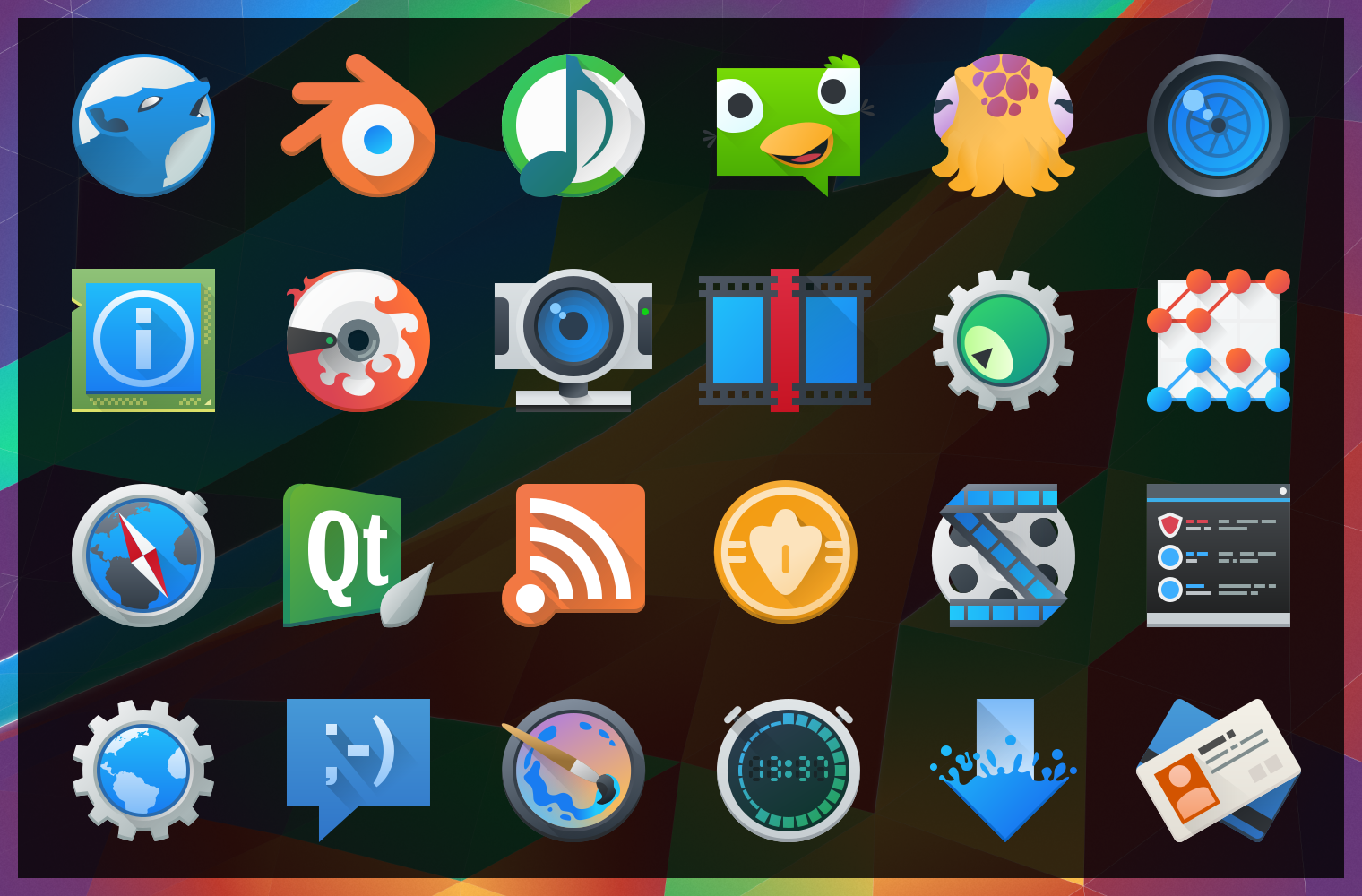
image10430After “harmlessly” throwing in a couple monochrome icons from my personal projects, I found myself reading a few of the icon requests and one thing lead to another… Now I’ve pushed in somewhere around 25 new icons, mostly towards apps with the goal of filling in gaps of common applications. These new icons will hopefully bring a much more cohesive launcher menu, with more core and popular applications having Breezy icons.

Some of these may be shunted to an extended repo; 3rd parties get antsy when they see their logos get “breezified”, so “branded” icons need to occasionally be separated from the main repository to avoid troubles and takedown requests.

Lastly but not least; Uri and Andreas have been nothing short of awesome in helping me get these out, thanks guys!

The tale of an annoying, terrible, awful wallpaper, and How I Made it.

I’d like to say that I’m less a man and more a force of nature – one able to sweep my hand and make art bloom at will… But this would be a lie, and occasionally getting art out there makes the only force I can muster feel like a fart in the wind. The new wallpaper for 5.4 just did not want to be made, and took days on and off trying to figure out what to do. I nearly just suggested we ship a backup wallpaper I had on the sidelines.

Eventually ideas got figured out, and after an unstructured failure (again, making me look at “the backup”) I started taking screenshots while using a more structured approach. I imagine I wanted all reading this to feel my pain. Either that or laugh. One of the two. Either way, the new wallpaper was one of the more involved processes used for a Plasma 5 wallpaper, and here are the steps for how it came together;

(more…)

Fiber UI Experiments – Conclusion?

It’s been one heckuva road, but I think the dust is starting to settle on the UI design for Fiber, a new web browser which I’m developing for KDE. After some back-and fourth from previous revisions, there are some exciting new ideas in this iteration! Please note that this post is about design experiments – the development status of the browser is still very low-level and won’t reach the UI stage for some time. These experiments are being done now so I can better understand the structure of the browser as I program around a heavily extension-based UI, so when I do solidify the APIs it we have a rock-solid foundation.

Just as an aside before I get started; just about any time I mention “QML”, there is the possible chance that whatever is being driven could also alternatively use HTML. I’m looking into this, but make no guarantees.

As a recap to previous experiments, one of the biggest things that became very clear from feedback was that the address bar isn’t going away and I’m not going to hide it. I was a sad panda, but there are important things the address bar provides which I just couldn’t work around. Luckily, I found some ways to improve upon the existing address bar ideology via aggressive use of extensions, and slightly different usage compared to how contemporary browsers embed extensions into the input field – so lets take a look at the current designs;

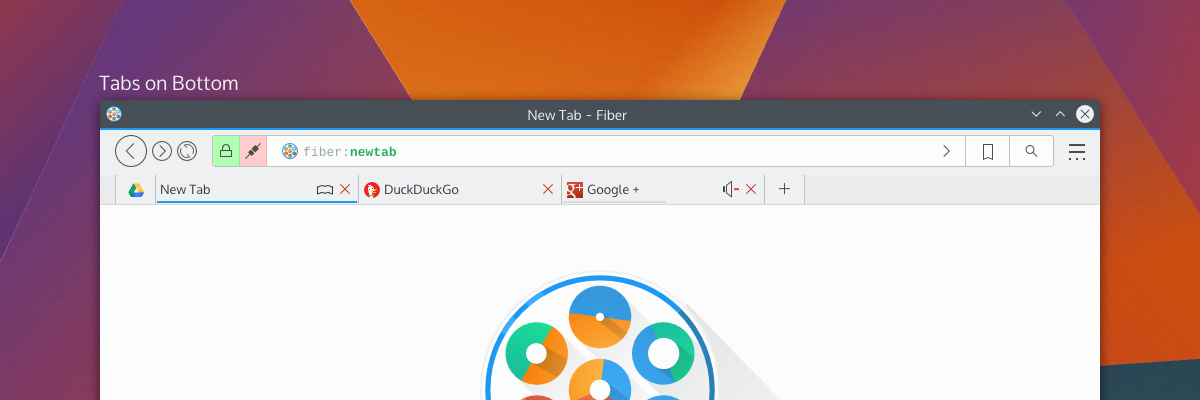
tabsOnSide tabsOnBottom
By default, Fiber will have either “Tabs on Side” or “Tabs on Bottom”; this hasn’t been decided yet, but there will also have a “Tabs on Top” option (which I have decided will not be default for a few reasons). Gone is the search box as it was in previous attempts – replaced with a proper address bar which I’m calling “Multitool” – and here’s more about it why I’m a little excited;

Multitool

Fiber is going to be an extensions-based browser. Almost everything will be an extension, from basic navigational elements (back, forward), to the bookmarks system – and all will either disable-able or replaceable. This means every button, every option, every utility will be configurable. I’ve studied how other browsers embed extensions in the address bar, and none of them really integrate with it in a meaningful and clearly defined way. Multitool is instead getting a well-defined interface for extensions which make use of the bar;

Extensions which have searchable or traversable content will be candidates for extending into the Multitool, which includes URL entry, search, history, bookmarks, downloads, and other things. Since these are extensions with a well-defined API you will be able to ruthlessly configure what you want or don’t want to show up, and only the URL entry will be set in stone. Multitool extensions will have 3 modes which you can pick from: background, button, and separate.

Background extensions will simply provide additional results when typing into the address bar. By default, this will be the behaviours of things like current tabs, history, and shortcut-enabled search. Button extensions in mutitool will provide a clickable option which will take over the Multitool when clicked, offering a focused text input and an optional QML-based “home popout”. Lastly, “separateextensions will split the text input offering something similar to a separate text widget – only integrated into the address bar.

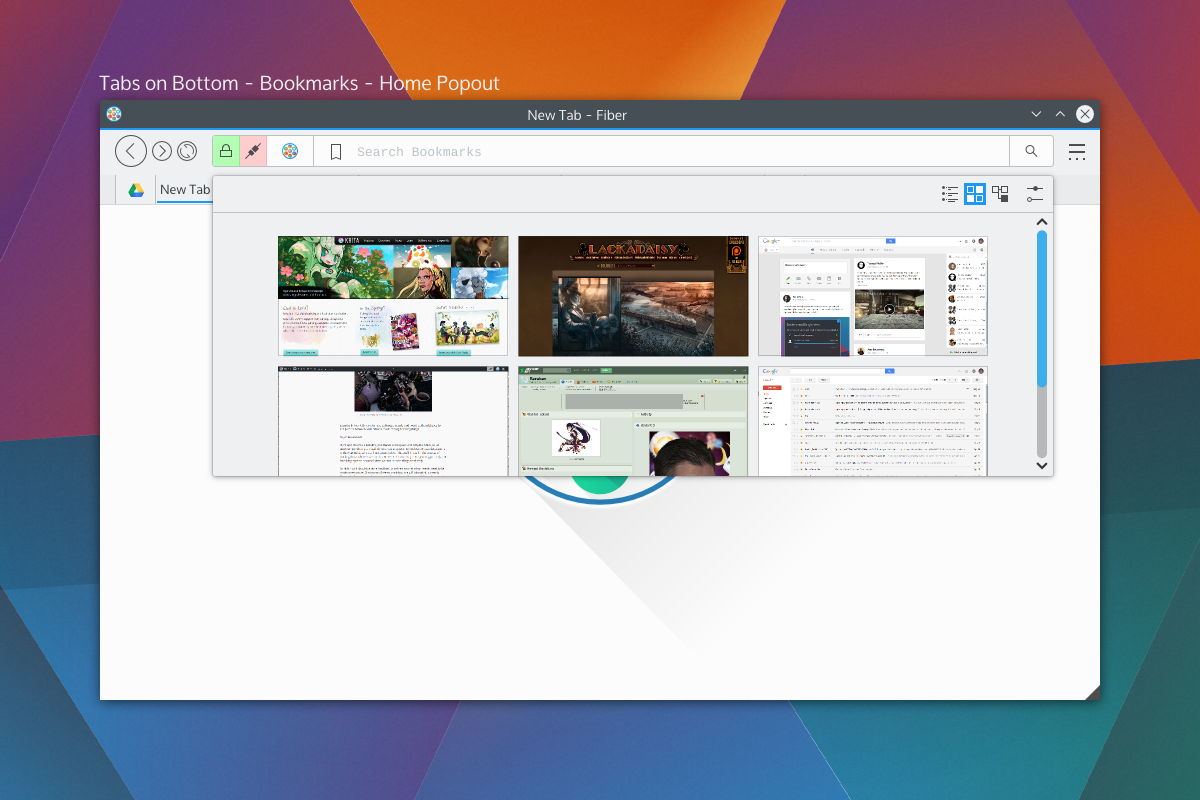
The modes and buttons will be easily configurable, and so you can choose to have extensions simply be active in the background, or you could turn on the buttons, or disable them entirely. Think of this as applying KRunner logic to a browser address bar, only with the additional ability to perform “focused searches”.bookmarkshome

Shown on the right side of the Multitool are the two extensions with dedicated buttons; bookmarks and search, which will be the default rollout. When you click on those embedded buttons they will take over the address bar and you may begin your search. These tools will also be able to specify an optional QML file for their “home” popout. For example the Bookmarks home popout could be a speed-dial UI, History could be a time-machine-esque scrollthrough. Seen above is a speed dial popout. With Bookmarks and Search being in button mode by default, just about everything else that performs local searches will be in “background mode”, except keyword-based searches which will be enabled – but will require configuration. Generally, the address portion of Multitool will NOT out-of-box beam what you type to a 3rd party, but the search extension will. I have not selected search providers.

We also get a two-for-one deal for fast filtering, since the user is already aware they have clicked on a text entry. Once you pick a selection from a focused search or cancel, the bar will snap back into address mode. If you hit “enter” while doing a focused search, it will simply open a tab with the results of that search.

Aside from buttons, all the protocol and security information relevant to the page (the highlighted areas on the left) will also be extension-driven. Ideally, this will let you highly customise what warnings you get, and will also let extensions tie any content-altering behaviour into proper warnings. For example, the ad-blocker may broadcast the number of zapped ads. When clicked the extensions will us QML-driven popouts.

Finally, the address itself (and any focused extension searches) will have extension-driven syntax highlighting. Right now I’m thinking of using a monospace font so we can drive things like bold fonts without offsetting text.

Tabs

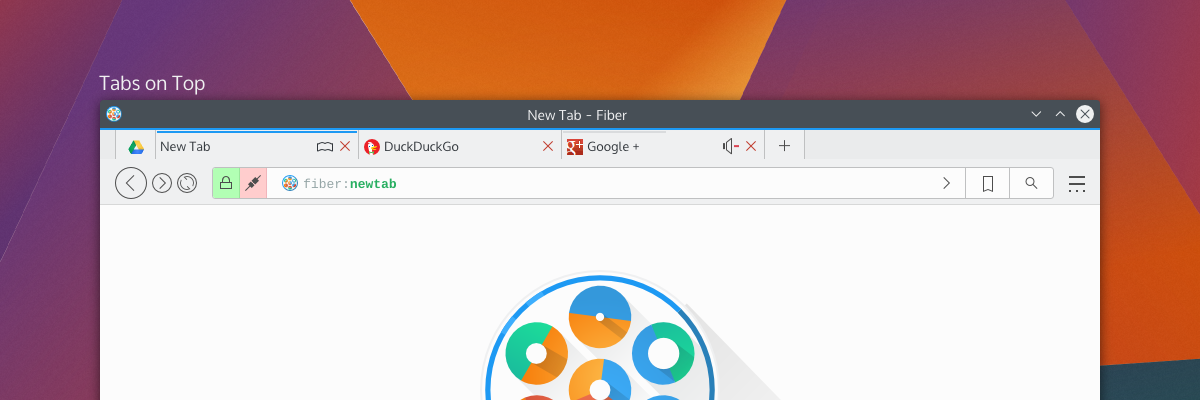
Tab placement was a big deal to people; some loved the single-row approach, others wanted a more traditional layout. The solution to the commotion was the fact that there isn’t a single solution. Tabs will have previews and simple information (as seen in the previous round of designs), so by default tabs will be on the bottom or side so the previews don’t obstruct unnecessary amounts of UI.

tabsontop

Fiber will have 3 tabbing options; Tabs on top, tabs on bottom, and tabs on side. When tabs are “on side” it will reduce the UI to one toolbar and place the tabs on the same row as the Multitool, and should also trigger a “compressed” layout for Multitool as well.

There will be the usual “app tab” support of pinning tabs, but not shown here will be tab-extensions. Tab extensions will behave like either app tabs or traditional tabs, and will be QML-powered pages from extensions. These special tabs will also be home-screen or new-tab options, and that is, largely, their purpose; but clever developers may find a use in having extension-based pages.

Tabs can also embed simple toggle-buttons, as usual, powered by extensions. Main candidates for these will be mute buttons or reader-mode buttons. There won’t be much to these buttons, but they will be content-sensitive and extensions will be required to provide the logic for when these buttons should be shown. For example, “reader mode” won’t be shown on pages without articles, and “mute” won’t be shown on pages without sound.

Current Progress

The current focus in Fiber is Profiles, Manifest files, and startup. Profiles will be the same as Firefox profiles, where you can have separate profiles with separate configurations. When in an activities-enabled environment, Fiber Profiles will attempt to keep in sync with the current activity – otherwise they will fall back to having users open a profile tool.

The manifest files are a big deal, since they define how extensions will interact with the browser. Fiber manifest files were origionally based on a slimmed down Chrome manifest with more “Qt-ish” syntax (like CamelCase); but with the more extensive extension plans and placement options there’s more going on with interaction points. There’s a decent manifest class, and it provides a reliable interface to read from, including things like providing missing defaults and offering some debugging info which will be used in Fibers extension development tools.I’m using DBus for Fiber to check a few things on startup; Fiber will be a “kind of” single-instance application, but individual profiles will be separate processes. DBus is being used to speak with running instances to figure out what it should do. The idea behind this setup is to keep instances on separate activities from spiking eachother, but to still allow the easier communication between windows of a single instance – this should help things like tab dragging between windows immensely. It also gives the benefit that you could run “unstable” extensions in a separate instance, which will be good for development purposes.I wish I could say development is going quickly, but right now my time is a bit crunched; either way things are going smoothly, and I’d rather be slow and steady than fast and sloppy.Development builds will be released in the future (still a long ways away) which I’ll be calling “Copper” builds. Copper builds will mostly be a rough and dirty way for me to test UI, and will not be stable or robust browsers. Mostly, it’ll be for the purpose of identifying annoying UI patterns and nipping them before they get written into extensions.