Category: Open Source

Plasma Sprint 2015

Just over 2 weeks ago I stepped off a plane, putting my heels onto Canadian soil after spending a week participating in the Plasma 2015 Sprint. The entire experience was exhausting in the best of ways, and after landing home my throughput was thoroughly trounced for some time as I settled back into normalcy. But lets rewind to the beginning;

The day of my arrival in Barcelona it would be a far cry to say I was nervous – in the moments before pressing the buzzer I was in a downright terror! These people will realise I’m an idiot! Ship me back to Canada on the next canoe! Needless to say only minutes in to the sprint not only were my worst fears completely unfounded – but I met a group as welcoming as they were brilliant.

Finally, I think I have the perspective to share my experience. I won’t try to recap the entire event, I will mainly focus on VDG work.

But first! The People of KDE

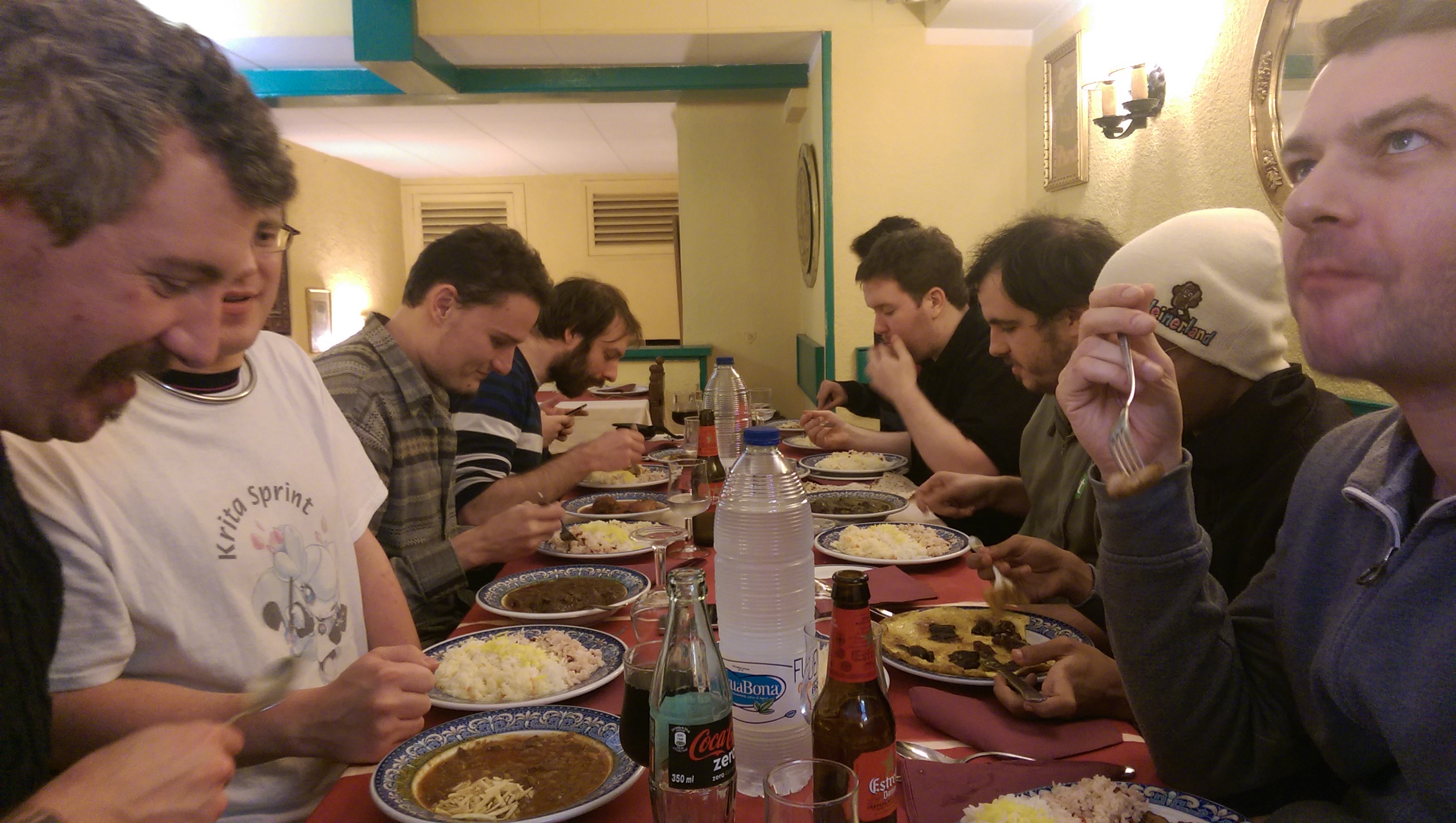
I met about a dozen dedicated and hard-working developers in the Blue Systems office during the sprint, and it needs to be said just how great these people are – each and every one passionate about their respective fields and projects. I’d really just like to give a shout-out to everyone I met in the Sprint. They’re the kind of people who make you smarter by proximity, and they welcome you to do it. For anyone invited to a Sprint I highly recommend jumping on the chance; you will be enriched for doing it.
IMAG0387_BURST001

Drawing Konquis

After arriving mid-day Jens Reuterberg headed the idea to begin creating and stockpiling promotional graphics. Essentially we wanted vector artwork which could be used easily for things like release announcements, large print materials, web pages, etc. Jens dove head-first into logotypes, and I splintered off into doing up a pair of vector Katie and Konqui graphics during my half-day; Konqui being a direct trace, and Katie being new. You can view the original graphics by the talented Tyson Tan here.

g4358

Download KatieDownload Konqui

VDG <3 Developers

There was a great deal discussed during a pair of review and planning sessions in the first two official Sprint days. One of the biggest things (for Jens and I) was helping the VDG and developers interoperate better; for those who don’t know, the VDG communicates very differently than mainline developers.

Devs tend to focus on bug reports, mailing lists, reviewboards, and IRC. Members of the VDG tend to use Forums, Hangouts, and to a limited extent IRC. Immediately there’s very little overlap, which means at this point developers have to go to the forums to wield the VDG.

The problem lies in how forums operate; where the VDG design processes benefits from the relative chaos, it’s not good for developers looking for the ‘final word’ of the design discussion. It’s further impacted by forum conversations which don’t have definitive conclusions, or discussions which can get muddled down. When developers go to the forums they need a solid final product to build around – but on multiple occasions they end with a half dozen different designs and no clear answer on what they should do.

It was a short discussion during the Sprint, but Jens and I both immediately agreed that this is an area where the VDG must step up and refine our process.

The current idea will be sticking with the forums threads as the main creative area, but changing the way they spin down. Once we feel a design discussion has gestated, the VDG aims to have a member pull the ‘final’ design from the conversation, at which point they’ll put together a coherent deliverable developers can understand and act on, on a channel they are comfortable with.

There are still details we are ferreting out before we more formally put this into motion, but the essential aim is to move the VDG into a position where we can reliably ship usable deliverable design, on a channel developers can comfortably handle.

Breeze Applications

This only came up briefly during the Sprint as well, but is something which has been brewing for a while now – so it might be worth mentioning ‘for realsies’, essentially since I don’t think anyone pointed out that this is a ‘thing’;

KDE and Plasma have a bit of a history with names, and for many core applications we’ve been wanting a more consistent scheme for it all. At the same time, with every major tookit release (i.e. Qt4 -> Qt5) many applications need to be ported or re-written. Finally, on these major releases, visual/workflow trends have usually shifted meaning the experience of applications will also shift.

So, all this stuff going on, we figure it’s time to put a bow on it and turn this cavalcade of factors into one cohesive event, so we’ve come up with the concept of Breeze Applications.

The idea is that, coinciding with frameworks, trend, and design changes we will name a subset of the bundled applications after the current design. So for Plasma 5 we will have ‘Breeze’, for some future plasma version many moons from now we may have ‘Gust’ or ‘Wind’ applications.

What does this mean? The biggest thing is that we intend to use these ‘Breeze’ applications as standards bearers, which we hope to see other applications follow. It’s much the same way Google treats ‘Holo’ and ‘Material’, along with their base applications: This is the design, these are the examples. Ideally we intend to focus on only a few applications, which developers will be able to dissect and say ‘oh, this is the plan’. In addition, as new technologies and techniques land, we hope Breeze applications will be the frontrunners in adopting cutting-edge KDE/Plasma technologies.

Does this mean every Plasma or KF5 app will be named “Breeze X”? No. We only plan on Breeze-ifying the more simple core applications which can be easily maintained, kept up to date, and streamlined enough that the code could easily be used for reference material.

Fun fact: The bathrooms in Frankford are powered by Ubuntu!

Fun fact: The bathrooms in Frankford are powered by Ubuntu!

Dynamic Window Decorations

Before I even get started on this, I must give props to David Edmonston. The man is a trooper, and I feel almost as if I tortured the poor gentleman throughout the sprint.

During the sprint I presented some of my DWD plans; technical details were discussed, implementation questions were raised, and concerns were were round-tabled. The discussion was extremely positive and productive, and real issues were ferreted out.

IMAG0392_BURST007

One of the larger questions was ‘what IPC protocol should be used?’; I personally was educated about the Wayland protocol, and that it could be used even on ‘non-wayland’ systems – since it is just a protocol and not an installed library. Ultimately, the developers present agreed that D-Bus was the way to go, the general consensus being that the protocol is known and familiar, mature, battle-tested, and isn’t going to shift or break.

I also gave my personal thoughts on how applications might access/implement DWDs, and while there’s still considerable room for discussion, it seems to be on the right track. I was cautioned by developers and I feel the need to point out: even when the DWD protocol does pick up steam it will still be years before it’s available in any meaningful way.

During the development portion of the Sprint I managed to rope David into doing some DWD work on a proof-of-concept level. Through his efforts we now have a much better idea of what obstacles we will face integrating widgets into server-side decorations, such as ensuring the draw code runs correctly/efficiently. He heroically managed to get window decorations to draw usable sliders, so we do know window decorations are capable of drawing server-side widgets.

Sadly, the proof did nearly cost David his sanity. It probably didn’t help that I was giggling like an imbecile. Sorry about that, David. I hope the tea made up for it. :/

UI Feedback

Throughout the Sprint Jens and I were able to lend our services in helping to design and streamline interfaces. Towards he end of the Sprint we also did a walkthrough of the Plasma desktop and several components to identify surface-level bugs and weak areas.

This included an extensive review of the system settings utility and its KCMS.

I also managed to chip in some light advice with a new power-manager tool, and an upcoming redesign of the Baloo settings manager with Vishesh Handa.

And a Great Deal more!

As I mentioned at the start of the post, and can only mention again; There were a lot of really great people at the Sprint – and all of them had their own projects, goals, plans, and feedback. It was really impressive to meet people who had such a deep understanding of KDE Frameworks and Plasma, able to talk about extremely complex technologies in detail over a coffee.

I, personally, learned a great deal from everyone. From being unable to compile a package to now comfortably hacking, simply rubbing shoulders with the outstanding individuals was absolutely my privilege.

There’s a great deal not in this post, but I imagine other posts will fill in the rest… So on a closing note I will say again; if you are ever invited to a Sprint, don’t hesitate to say yes – it’s an amazing experience which is beyond worth it!

I drank this. I still don't know what it was.

I drank this. I still don’t know what it was.

How Bread is Helping Make Breeze Cursors Pixel Perfect

Some people accuse me of being a crazy person. Others are wrong. But occasionally the seeming madness of it all will bring about good things.

Last night was a sleepless night in all the good ways; I’m excited for the upcoming Plasma Sprint, and knowing I’ll be packing myself into a cigar tube and flinging myself across the North Atlantic Ocean is too much for me to sleep over. I had promised a commenter (too long ago) I would make green cursors, so I decided to make good on my word. After it took 5 minutes I needed more; and the wafting smell of my bread maker inspired me to make a Bread cursor theme. Once that was done, sufficiently delirious, I sent my weird bready message to the VDG. They appear to have ignored it – a wise decision. They’re busy people doing actual work.

bread

Today I opened up the cursors to see what I had done.  Nothing too terrible, and I decided it was worth polishing them up if just for the larfs. One of the touches was to add a half-pixel white outline between the crust and loaf for contrast.

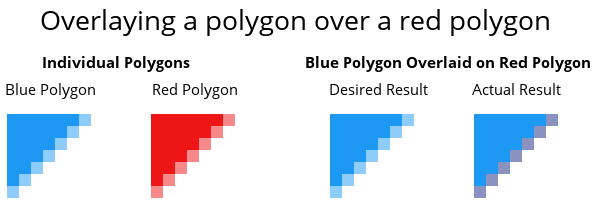
When I rendered the tweaked cursors, they started to look awful because of how SVG images layer and clamp nearby vectors. Simply put on a vector edge, even if there’s another identical edge above it, both edges will affect their neighbouring pixels as opposed to the upper vector shape ‘blocking’ the lower shape.

sample1

The “desired result” is the result a designer would expect, while the actual result is technically correct.

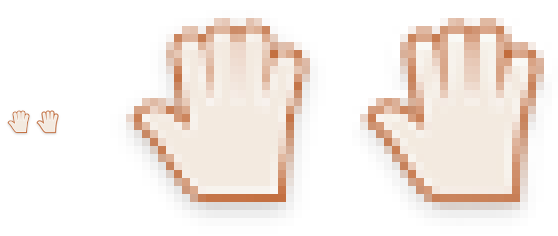
This had the effect of making the hand of my newly minted bread cursor (with the most edges) look “washed out” because the two lighter inner layers were covering the outline.

sample2

The solution for this problem is to ‘supersample’ the cursors in our build scripts. Supersampling is when you render the image at a much higher resolution, and scale it down to the desired resolution. Instead of going directly from Inkscape to a final image, we first export each cursor to a temporary file which is 4x standard resolution and 2x double resolution. We then scale down and copy that image to the final resolutions.

The end result is going to be the option for us to more easily use sub-pixel detailing in cursors without worrying about losing smoothness; any extra detail may not be noticeable on a day-to-day level – but it’s the polish Plasma users are beginning to expect. Additionally, high-resolution cursors will also benefit because the half-pixel details will become full pixel details, and on a high-quality screens you’ll have ultra-sharp graphics.

breadAnd that’s how bread is helping make Breeze cursors pixel perfect!

Now, super-pixel-perfection isn’t that noticeable so there’s not going to be a rush to update existing cursors; but if one day you quietly notice your cursor is a little bit sharper than it used to be – you can thank bread.

Download The Cursors:
(extract “compiled” cursors to your icons folder to install, or download the source to edit or remix them. Golgari is a green/black theme)

Bread Source
Bread Compiled
Breeze Golgari Source
Breeze Golgari Compiled

Plasma 5.2 – The Quintessential Breakdown

header

KDE is one of the oldest open-source desktop projects which can be found today, and over the years it has established a rich history of highs and lows. During some points it has been the undisputed ruler of the desktop world, while other times it had fallen behind or faced hard trials.

A memory everything but forgotten, just over 6 years ago KDE tore itself apart in spectacular fashion to assemble itself anew. Brave users who wandered through the rubble and wreckage saw developers rebuild the KDE before their eyes, witnessing the birth of ‘Plasma Desktop’ and it’s sister project ‘KDE Development Platform’. It was universally understood that this twisted gnarled creature of a computing experience was both hideous yet full of potential, and over 5 years of refining Plasma it had struggled, crawled, hobbled, walked, run, and eventually mature into a fine desktop.

Despite becoming an accepted way of computing there has always been one nagging persistent issue with it all; KDE is old and the legacy it inherited was a knotted mess of a foundation, with over a decade of old code accumulating to encumber nearly every aspect of the system. Software could not be written to use KDE Development Platform without pulling in so much baggage, and like a bundle of cords or strings there was no chance of pulling one from the mess without receiving the entire ball of twisted tangles; even a simple media player could bring in nearly all the legacy materials, even when used outside the Plasma desktop.

KDE developers knew what had to be done and set into motion years ago a complicated, time-consuming, and challenging goal: “we must untie the knots”. With a looming Qt5 transition on the horizon (the underlying toolkit used by KDE) developers saw their opportunity to untangle the ball as they ported to the next Qt.

But there were fears, warranted fears, that this process would again lay waste and pervert the now solid Plasma Desktop, people fearing they would be forced to decide between their beloved systems with an expiry date, or a new era of painful unfinished instability. The developers had a different plan in mind; a silent revolution planned to pass silently with little fanfare, as the underpinning foundations are churned into a sleek and modular framework which could be as loved as the desktop which used it.

“We must untie the knots.”

That day has already come and passed; dubbed “KDE Frameworks 5” for the technology, and “Plasma 5” for the environment/applications, these technologies have been in circulation as technical demonstrations and alternatives for some months now. A combination of nervous anticipation and memories of being burned by the 4.0 releases lead all but the bravest to venture early and discover nothing nearly as painful as the transition between KDE 3 and Plasma. With KDE Plasma 5.2 being formally announced as the default environment of Kubuntu 15.04 due only months away, Frameworks 5 and Plasma have been recognised as maturing usable products – which means it’s time to take a serious look at what to expect when you turn it on for the first time.

For the sake of simplicity I will be referring to KDE Plasma Desktop as “Plasma 5.2”, KDE Frameworks 5.6 as “Frameworks 5”; most regular people don’t need to know the exact version of the frameworks, and this review will be focused on the experience of the Plasma 5.2 desktop as it feels today. Some parts of the Plasma 5.2 experience are holdovers from Plasma 4, but I will cover them all the same should new users wonder if the hand-me-downs of the previous generation desktop gel with the new experience. I won’t be covering most technical issues in this breakdown; there are several that I had, however I’m using Beta software on an Alpha operating system – technical issues are to be expected which won’t impact final releases.

KDE Frameworks 5.3 & Plasma 5.1 – First Impressions

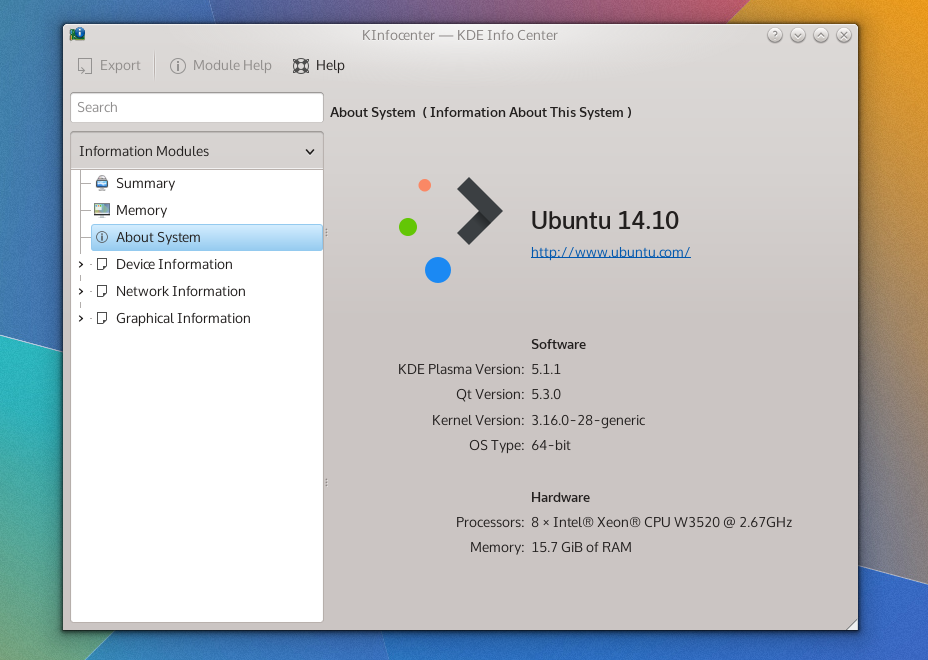
Today I took the plunge into the next-generation KDE desktop, performing a dirty upgrade from Kubuntu 14.04 to 14.10 before installing the plasma-5-desktop package; and this is my first impression of KF5.x and Plasma 5. This is also a bit of a primer, because when Plasma 5.2 enters the stage I’m interested to see the comparison and do a second write-up, using my experience in both 5.1 and 4.x as points-of-reference.

specs

The Old & New

Many KDE applications are in a transitional state and not migrated to KF5, so summarising the applications’ of KF5 as “uneventful” is apt because there are literally no events. I don’t know how a great deal of this is being handled, and it could just be from my method of installation, but aside from the system settings panel almost all the core applications are still running KDE Frameworks 4. Uneventful can be good, and I’d rather apps take their time porting to KDE 5 than sloppily rushing their ports. So, upgrading to the next-generation won’t gut your applications, and that’s a good thing to know an upgraded desktop won’t be paired with potentially unstable apps.

This makes me note how differently this iteration of the frameworks has been handled in contrast to Frameworks 4; there’s no mad science going on here folks – this major transition is being handled with caution and care.

Widget Shuffle

When it comes to the desktop itself, the reserved nature of the application updates speaks nothing of what you’ll get with the desktop widgets; a complete replacement of everything you’ve got. This sounds obvious, but at first blush while KDE looks similar to its forbearer with the white panel at the bottom, sporting the same widget selection and placement as its predecessor – that’s where the desktop similarities end, and it’s probably easier to name what’s stayed the same than everything that’s changed. This all makes sense, because swaths of the desktop *had* to be re-written, and the authors didn’t want a rocky transition this major release.The changes I did encounter aren’t flow-breaking and you won’t feel like a drunkard stumbling around unfamiliar territory, it’s still got KDE DNA and while you will have several “oh that’s different” moments: I’m glad to say they’re mostly good.The bad news first though; at least in Plasma 5.1 many of the widgets you may have used simply don’t exist yet. New and returning widgets are in the pipes, and with time they will surely return with the same level of polish found in the current crop of widgets, but with such a dramatic re-write it will take a few releases for all the widgets to catch up.

The good news is that the Plasma goodies which do make an appearance are universally improved. KDE has fully committed to QML as the language used for programming desktop components, and this decision has yielded a much more consistent desktop. It’s one of those things which is difficult to put your finger on, but it’s all just a little more cohesive.

snapshot1

There are a few notable new widgets and behaviours I’d like to specifically mention. The new search widget is shockingly fast, organised, and a hidden treasure. The notifications tray has been reworked; it’s easier, simple, consistent, and often integrates controls more smartly than before. The applications menu launcher, despite having no outright usability differences, also “feels” better.

Stability & Bugs

I’ll say this outright; KF5 and Plasma 5 are not nearly as mature as yesteryears KF4-based desktop. After installing the update and doing a complete reboot I’ve suffered several crashes, and Plasma had at one point managed to forget my colour and wallpaper settings. A second restart seems to have shored it up, and the desktop now seems to be stable; perhaps it had to overcome stage-fright? I’ve had several issues with the Plasma desktop, ranging from the desktop placing the ‘add widgets’ tray into the middle of the screen (seemingly “docked” onto a window), and the system settings application behaving like a petulant child.

With all that aside, for en early revision of a recently overhauled desktop environment, (after it calmed down) it’s become more stable, and it’s been running a full day without issue. With that being said, I’ll be looking at 5.2 before I take a more firm stance on stability and making recommendations based on that factor.

Performance & Animation

I have one of those huge Aluminium Mac Pros which I’ve upgraded it significantly during its’ lifetime, yet despite my heavyweight computing power and KDE never feeling ‘slow’, I must admit often times it didn’t necessarily feel ‘fast’ or ‘smooth’. With KF5 and Plasma 5 the desktop for the first time feels *smooth*, please understand I’m saying it feels buttery, slick, and silky in all the right ways.

This can be attributed to Qt 5, which has moved to a hardware-accelerated graphics-stack, and while KDE has taken advantage of hardware acceleration since KF4, it was not nearly as pervasive throughout the entire toolkit as it is in this most modern environment.

There also seems to be fewer visual glitches associated with the desktop; KF4 had some minor issues where it might blur a background or draw a shadow before whatever content was to be placed on the screen. KF5 and Plasma 5 have reduced these issues, but odd moments of ‘hiccups’ which reminded me of KDE 4 can be rung from the system if you launch an unloaded plasmoid from the panel. These visual hiccups are incredibly minor, but do detract from the incredible mirror-shine polish that I feel will become expected of the modern Plasma desktop.

This can be seen a split-second before the content catches up and fills in the popup.

This can be seen a split-second before the content catches up and fills in the popup.

Animations throughout the Plasma desktop are both more pervasive, consistent, and smooth. Everything feels animated, and it makes the desktop feel more alive. The animations and movements within widgets themselves look consistent, and are overall much more tied together. It feels less like desperate parts bolted onto a desktop, and more like a single whole dancing to the same tune.

Look ‘n’ Feel

Once again, a disclaimer; I’m a member of the group managing this aspect of KDE.

Out of the gate, Plasma 5 is both more and less visually polished than the Plasma 1 experience, it’s give-and-take. Generally, the “new look” (named “Breeze”) for KDE aims to be simpler, less cluttered, and more ‘designed’. The layout of just about everything has improved dramatically; this is in blatant disregard to your selected theme, being a core improvment on an applications’ and widgets’ level. Things don’t feel so tightly packed together, and it allows your eyes to rest more easily.

(as a side note, in my screenshots I’m using Oxygen again)

The new applications’ theme (as it stands in 5.1) can feel Spartan, with reduced chrome in the windows, more focus on spacing, and whiter default pallet. These are still clearly the early days for Breeze, and quite simply it hasn’t had the 6 years Oxygen has had to fine-tune its design and mature. That being said, it’s a very different style in it’s most core concept: Oxygen had head-first jumped into an extremely heavy and visually intense theme which gradually lightened itself up, while Breeze has started with an extremely minimal design.

The majority of toolbar icons no longer have colour, instead using a monochrome design, and it can sometimes take an extra few moments of searching to locate icons you’re looking for on the toolbar. This is offset by vivid content icons which readily call to your eyes, sporting near-pastel colours and thoughtfully laid out structures. Overall, the icons shift focus away from the UI and towards content, and you really don’t feel like the chrome of the windows is there.

The end result of all these changes is a much lighter feeling KDE. The UI gets out of your way more, and instead of attempting to woo you with distractions it’s clear the next generation desktop will have a reserved respectability in terms of costly design choices that will create a more elegant environment.

Settings & Configuration

Plasma 5.1 is configured to feel a great deal like the traditional KDE desktop, with the standard panel, mouse actions, and shortcuts, but things diverge a great deal in the system settings application which has been completely rearranged. Previously the grouping of the settings menus felt random as they were built on the leylines of technical details over user-oriented goals, while in Plasma 5.2 they are more sane to users, being grouped more by goal than underlying mechanics.

Desktop configuration (specifically managing widgets) has been incremented upon, with some changes feeling slightly arbitrary. The “add widgets” panel now slides in from the left and adding widgets now presents a “drop indicator” which illustrates where on an underlying grid your widget will be placed to help avid widget-users keep everything aligned. Widgets still have the slide-out drawer, which can often seem strange in how you interact with it – but it’s unchanged.

Several widgets on KDE which beg for configuration options open up bare settings dialogues, such as the search widget. While this is a minor nit-pick, it’s the type of issue where you know the first step is still going to be building the selection of widgets available, and you’ll need to wait to play under the hood of the high-quality widgets bundled with KDE.

Final Notes

KDE Frameworks 5 and Plasma 5.1 create a fine environment, but one that is still visibly in it’s early days – you could almost say it suffers from many small papercuts, avoiding the haemorrhaging issues that soured the initial KDE Frameworks 4 release. With a completely re-based desktop I don’t feel these little cracks will remain for long, as it seems the developers have a firm grasp of what needs to be done and exactly what they want to do. For a major point-release, there’s a real feeling that this software will reach rock-solid stability very quickly given the state of it as it stands.

Now, do I recommend Plasma 5.1 for general use? Compared to the current 4.x Plasma release?

If you were installing fresh I’d say go for Plasma 5, but if you were just considering an upgrade, I’d wait. Plasma 5.2 is coming in hot, and I believe it will be the beginning of this next-generation desktops’ serious push to bring people to this fine new desktop. Even if it doesn’t reach feature-parity with the previous desktop, I imagine 5.2 will be the ice-breaker for the interested public with 5.3 will more/less beginning the larger migration to the 5 series desktop.

DWD – a FAQ for questions around the Web

Don’t know what DWDs are? Click the link below to find out!

http://kver.wordpress.com/2014/10/25/presenting-dwd-a-candidate-for-kde-window-decorations/

It seems about the right time to post some common questions and misconceptions about DWDs I’ve seen around the web, so here’s a general FAQ about DWDs; If I missed any questions about DWD, please post them!

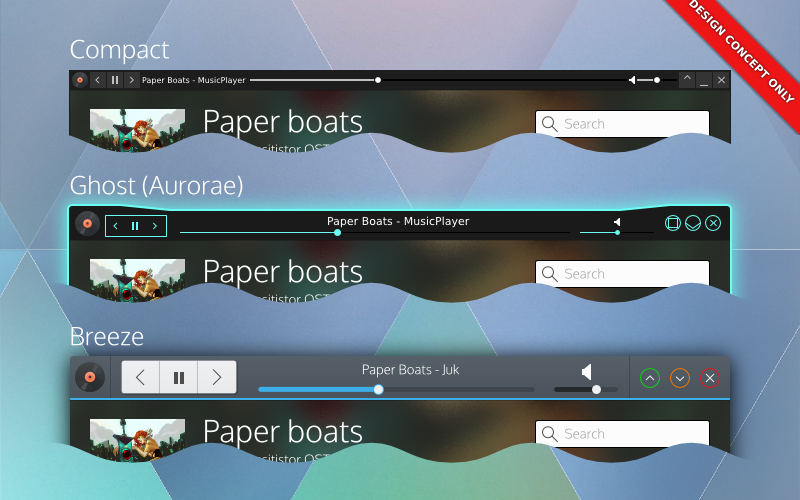
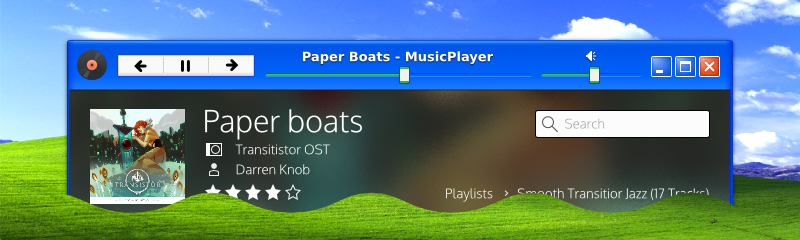
Window decorations would be responsible for widgets. Here's 3 potential window decorations using DWDs.

Window decorations would be responsible for widgets. Here’s 3 potential window decorations using DWDs. Note that the decoration dictates style – and users dictate the decorations. Complete control of your personal preference.

DWDs are going to make my windows inconsistent and ugly! Application widgets might clash with my window decoration!

DWDs are not CSDs, and all theming and drawing is handled by the window manager and decoration. In addition, applications only export the structure of their widgets, they do not pre-draw or draw the widgets themselves. Applications would have little or no say in how their decorations look, just like traditional SSDs.

That being said, we don’t want DWDs to be absolutly rigid, we are looking at ‘safe’ ways applications can do basic branding on themselves in a reasonable manner, which decorations could potentially integrate without excessive effort. The main thing we are looking at is allowing applications to offer a colour pallet which decorations could use to tweak their appearance, but DWD ultimately would put the power in your hands and options would also be provided to disable unwanted hints and effects for more consistency. A primary sentiment with DWDs is that the user would be completely in control of all aspects DWDs would provide.

Will I lose my current customizations, or ability to customise? Will I lose the ability to customise my windows in the future?

No! DWDs will actually give you more options – at least in KDE.

The only change to your existing configuration might be the switch from standard SSDs to DWDs when the option is initially added (or deemed stable). If you wanted your current setup to reign supreme, you could simply disable DWD-based widgets, and your desktop would be remain identical to how it is today.

I want features like controls on my phone, or controls in the panel, but I don’t like widgets in window decorations. Can I have one but not the other?

Yes. Since DWD is just a protocol, we could potentially build DWDs to be enabled/disabled on a per-service basis. You disable it in kwin, but keep device integration, or vice-versa.

How will I move the window if everything is interactive?

There are a few things we can do to address this issue.

The first is by looking at individual widgets and checking to see if they could conceivably be dragged. For example, buttons could easily be considered draggable surface. Progress bars are a draggable surface. About the only things that can’t really be dragged (which we would include in the specification) are tabs, text inputs, and sliders. Sliders take very little vertical room, they are less of an issue.

Next, we’ll recommend decorations insert generous area of padding in parts of the frame, which would provide grabbable area to drag from. Of course, if you have something against padding and would rather drag a window by holding alt – I’m sure an ultra-compact theme will accommodate you.

Lastly, we’ll also look at how widgets are configured, and potentially we could offer alternate behaviours for widgets. If users didn’t care about the order/arrangement of their tabs, we could easily have an option to just make tabs another draggable surface (and disable rearranging). Sliders could have an option to require users specifically use the knob. Text inputs could be set to require focus before a drag->select can occur. There are many options.

Overall, we want to assume that at least one or two apps will “abuse” DWDs, so I’d want to build ‘safety’ on the decoration level.

DWDs are complicated / CSDs would be simpler.

For applications developers DWD should be similar in complexity to CSD but will have extended options available and additional features, while omitting APIs for complex styling. DWDs will not impose default structures or layouts, or make assumptions about your layouts. Overall, DWD should be roughly equal to CSD for applications developers; they’ll likely just have a different API focus.

On a system/library level CSDs may be simple when you look at them in face-value; a simple library lets a program draw its own more functional header. But when you look at the grand scheme of things CSD libraries by nature don’t care to integrate with all environments, causing massive headaches and complexity to all other developers outside the targets of the CSD library; if the CSD library did attempt target target all environments, the CSD library itself would be *insanely* complex. Simply put you’ll never, ever, ever hear about a CSD library that supports KDE, Gnome, Windows, Mac, Unity, etc etc. DWD also forgoes the need for complex hacks and workarounds that desktop environments have had to kludge together; such as enabling corner-dragging in the toolkit because there’s no window manager support on frameless windows.

With DWD, environments can choose to support or not support DWDs, and provide incredible amounts of integration which CSDs simply cannot offer. Environment-specific integrations applications are doing (such as menubars) is primarily done through kludges and duct-tape, and even then they still don’t properly support every environment. Unity/Mac-style menubars are so broken in so many places it’s silly; support for the same applications and desktop environments vary from distro to distro. Gnome is moving towards eliminating them completely, with Gnome devs expressing that it’s one of their goals.

Lastly, the look and feel is also less susceptible to breakage; it’s been noted that GTK will often break themes, meaning theme developers constantly have to keep up with CSDs. With DWDs, the window manager doesn’t even know or care about the toolkit – it just follows the standardised instructions.

In other words once you step outside a face-value glance, DWD eliminates huge amounts of complexity – and more importantly breakage – through consistency. And support, while initially about as bad as CSD, actually has a chance of propagating across multiple desktop environments and toolkits reliably.

The buttons are too big! I hate this big button trend! (aka, I don’t like the look! It should look like this!)

I agree! DWD applications should absolutely fit and feel exactly how you want them to. If DWDs are implemented, it would be up to the window decorator and decoration to provide options like spacing, sizing, look and feel. So aside from the options decorations themselves might be able to provide, being able to completely change the decoration or decoration engine is an option. You could use minimal themes, fancy themes, ultra-compact themes or even embed the controls elsewhere and use a minimal wire-frame. DWDs would give you *more* control over the look of your applications than you’ve ever had before. So if you think one style is ugly, you aren’t ever stuck with it.

I don’t like DWD or CSD! Just keep SSD! Keep my titlebars clean!

Depending on the window manager using DWDs, buttons in titlebars could be disabled; resulting in traditional SSDs. The DWD specification is aiming to be completely backwards compatible, which means we also get a traditional SSD mode for free. That being said, DWD is still mostly conceptual at this point, so you’re still ‘safe’ from the evils of UI changes for a while.

Could my toolbar menus be placed in the window frame if DWDs aren’t supplied?

I personally would not fold this in to be a part of the DWD specification – but developers might decide otherwise. In my designs I had DWDs placing the application menubar into an overflow portion of the command menu; I should elaborate on that:

Ideally menubars in DWD command buttons would be an application-specific option and not part of the core DWD specification. Not all applications use menubars, and in some cases (such as productivity or professional applications) the application *needs* those menubars front-and-center – not behind a button. The DWD client library would likely just include a convenience function that would allow easy menubar embedding into the command menu’ putting it into the applications’ control.

In other words, I think this should be a Kwin-specific thing, and not a DWD-specific thing. The goal of DWD isn’t to ‘take over’ the window, merely to extend it.

Could DWDs fall back to CSDs?

Yes, they could! But no, KDE won’t!

One of the few things about KDEs’ implementation would be that we would not use CSDs as a fallback ourselves. DWDs could conceivably fall back to either CSD or SSD, but it would be an application/toolkit decision. KDE sentiments are falling back to SSD if DWD became a thing, and I personally agree with that choice. KDE/Qt technologies are designed to be used in a cross-platform cross-environment manner, and CSDs are probably the least portable thing you can integrate into a program for a number of reasons.

That being said, other environments/toolkits – if they decided to pick up DWDs for other potential benefits – could use or switch to CSD as their fallback.

Could other toolkits & programs be ported to DWD? Or is this just going to be KDE/Qt?

DWD, being a protocol, is highly portable. Native implementations in various toolkits should be possible; not just Qt and Gtk, but wxWidgets, Java, or others could implement it. In addition, toolkits would not need to worry about their environment in DWD, so a GTK application with DWD could fit right in with KDE, and vice-versa (if a Gtk environment hopped on board the DWD train). That being said, we don’t know who is interested in DWD outside of KDE, and even if they were it would likely be a while before it started propagating around.

Some applications which offer plugin support could implement DWD by using their API by hiding native widgets – Firefox being a prime example. There may be limitations to customization from implementation to implementation, but it is possible. Some applications (such as Google Chrome) are more questionable as to whether or not this approach would work, but it’s still better than nothing (its known chrome has ways of hiding the tab bar, but I personally don’t know enough about the chrome addon API to know if it’s possible in that context).

Gtk programs using CSD are a much tougher question to answer. I don’t know much about the Gtk-based “headerbar” CSD library, but if *any* solution were to bring DWD to Gtk it would be in that library. From what I’ve been told there are likely significant hurdles, and if DWDs were to be implemented it would be for feature-oriented reasons, meaning early cooperation or adoption is unlikely. Either way, DWD is being designed to be toolkit and environment agnostic, so there won’t be hard KDE/Qt-driven requirements in the implementation. Also, I need to stress that I’ve heard of no interest for DWDs from Gnome or Gtk developers – Gtk may ever use DWDs.

Will the DWD protocol use DBus?

DWD will likely be DBus-based. This likely means DWD features will be disabled on Windows unless a windows-specific utility library is written using QtWinExtras (for Qt applications); If such a library were to be implemented, it would offer a truly cross-platform way to use many currently windows-specific features, such as thumbnail toolbars, icon overlays, and Glass.

For external use (like networking or bluetooth) it depends entirely on how developers want to approach it, whether or not they would be in the core protocol, or use external plugins/services to extend the base functionality of the specification. I simply don’t know the optimal solutions or how developers might approach DWDs from a technical standapoint.

Could I have my decorations on the side or bottoms of my windows?

That would be up to the decorator, theme engine, and system; applications won’t get to know how their DWDs would actually be implemented, nor would they get get ‘final say’. The DWD protocol will provide applications with the chance to provide hints and metadata to how they believe they would optimally be displayed.

KDE developers are leaning towards consistency in the UI, so that consistency is being built in to an extent; There are ‘hints’ I’d like to see specified that the default KDE setup would not use, but we do need to consider the fact that other decoration engines or environments might want those hints. If a hint was of significant and immense value our applications would readily want to request, I will seek to have those hints included. Once a specification is made, it gets much harder to extend over time (and then get new feature adoption) so I feel it’s important to have obvious specifications included, even if we ourselves won’t use them in our default setup.

Things like position hints, colour hints, font hints, and other which could realistically be desired I think should be included in the spec.

Is DWD secure?

DWD will broadcast window controls, and this obviously means if DWD is done poorly, it could grant access to applications and cause all sorts of trouble.

For a very real example: Dolphin will open a web-browser if you type an HTTP address into it. Odds are a file manager with DWD will offer the location input. Someone hijacking your file managers’ DWD could allow them to open your web browser to a malicious web-page. If DWD is done improperly, scenarios like that become possible. Scary!

Already, my personal DWD specification is addressing issues like this. I won’t get into technical details, but DWD will be locked down by default, and flags will be used to express where, how, and who can access individual widgets; with denial outside non-root window decorations being the default access policy.

So, yes, DWD has security in mind, and will be well locked-down.

DWDs will allow *any* widget in the decoration / Applications will draw the widgets and DWD will just import them.

False. The widgets will be drawn by the consoles, so DWD has it’s own widget vocabulary, independent of the widgets offered by the applications’ toolkit to ensure consoles receive predictable input. We also don’t want to simply include everything + the kitchen sink, as having too many widgets means more complexity, more work for theme designers, and more work for implementations. DWD isn’t meant to be a “put your application in the header” library, it’s meant to compliment the main interface.

That being said, the widgets being drafted cover pretty much all reasonable use-cases and will aim have all the most common widgets, including buttons, buttongroups, breadcrumbs, sliders and other goodies. I don’t know what developers have in mind when they picture the widgets, but the final widget will be well thought out so designers aren’t overburdened creating DWD-ready decorations, and application devs still have the tools they need to build high-quality interfaces.

What will the first KDE release using DWDs look like?

The VDG has been keeping this under-wraps for some time, but we have designed a new, original, beautiful interface which KDE will default to when we switch to DWDs. We believe a lush photographic background will be key to adoption, and bold colours with subtle hints of depth will be the norm in the future.

nononono-dwd

Modern. Beautiful. Original.

Footnotes;

I’m going to be going holding off on DWD-related posts beyond this until I’m more firmly in touch with developers on the topic (which may be far off, we have busy devs!); I’m beginning to rub up against the boundaries which I can reliably talk about without referencing them first. This post was written simply to address C&Qs around the web (which I saw) and thought I’d address; as usual, this post is not guaranteed to be accurate, and when developers start aiming towards an implementation they could go in a complete different direction than what I’ve written here. So, salt people!